
If you are receiving an account not found, eligibility error, a registration error, or just generally confused, please review the following common troubleshooting tips when trying to register your WellConnect+ account...
- Verification Criteria
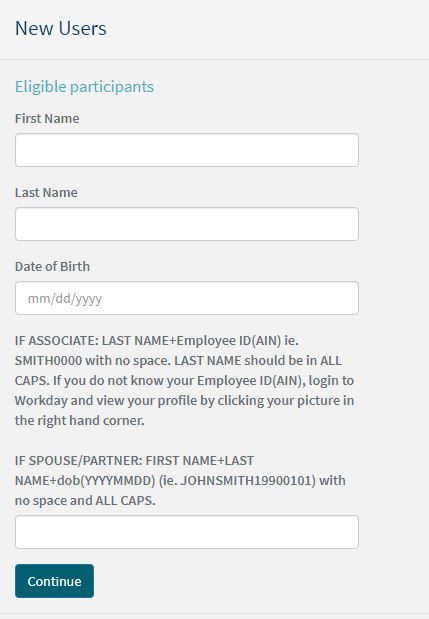
The most frequent point of confusion is around the criteria for verifying your account or the 4 things you need in order to access your WellConnect+ account.
Before issuing a ticket make sure you are following all directions closely!
- Use the First and Last Name that you know is on file with your HR office
- DOB = MMDDYYYY - example: 01/01/1990
- 4th Identifier can be confusing so it is vital to read the instructions provided (some can be trickier than others) and enter it EXACTLY as you see in any examples. There are typically NO SPACES in this field.
Note: If there is ever confusion on what is your Employee ID number it is always recommended to check with your HR coordinator for clarification. LES cannot provide this info to you!
- Date Of Birth (DOB) Issues
You can see above that Date of Birth can be confusing. Always be sure you are entering it in MM/DD/YYYY format.
- Password Requirements
Once you get past the verification process you will be asked to complete a few additional pieces of information and create an account password.
Be sure you are following all of the provided password guidelines.
Please set a password between 8 and 18 characters long that contains at least 1-uppercase letter, 1-lowercase letter, 1-number, and 1-special character.
- Visitor Access Code
This information should have been provided in the original scheduling communication that came out from your company. Please look back for that information and enter the access code exactly as it is written. IT IS CASE SENSITIVE
- Completing all Fields
be sure that you are carefully reviewing all of the requested fields when trying to finish registration. You need to complete all required items, input a visitor access code(in some NOT all situations), create a password, and agree to the terms of service.
Be sure not to overlook anything!!
- Already an existing User
If you keep getting an error that mentions a user already exists then try to reset your password. Maybe you are better at this than you think and you already have an account ready for you!!
Comments
0 comments
Please sign in to leave a comment.